Manage Training
The Manage Training page allows to view, manage and create records and trainings. Training records help track the training and competencies of an employee or group of employees. A training helps to group logically a set of records and ensure the acquision of records. Typically, by completing training an employee can earn one or a few records required to perfom some type of jobs.
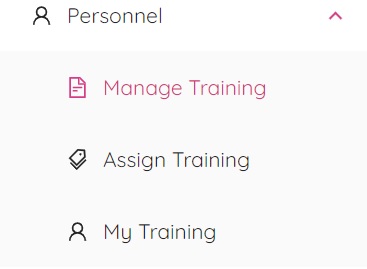
By selecting Manage Training from the Personnel menu you will be redirected to the Manage Training page.

The page is divided into two tabs - Manage Record and Manage Training.
Manage Record
Records are an excellent way to help keep track of all the certifications, competencies, qualifications and knowledge each employee obtains. A record can be created by clicking the New Record (+) button located under the Manage Record tab. You will see a box similar to the following.
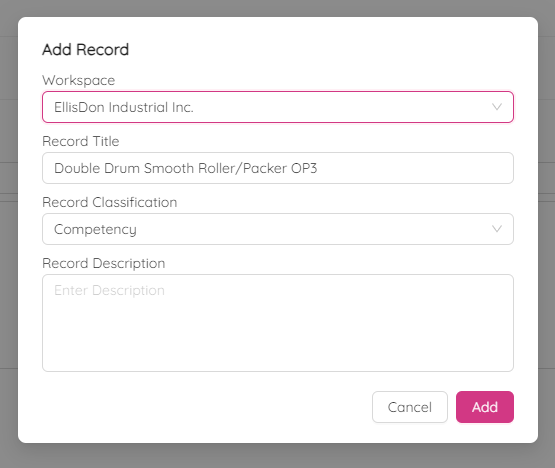
To add a record, select desired workspace and enter record details such as title, classification and short description.
The classification can be one of the following:
- Competency
- Certification
- Qualification
- Knowledge
Submit the record by clicking the Add button.
Manage Training
Training helps an employee to earn records. Training can be created by navigating to the Manage Training tab and clicking the New Training (+) button. Multiple records can be associated with a single training. Training can be assigned to employees to keep track of what qualifications they have and when their training will need to be renewed if applicable.
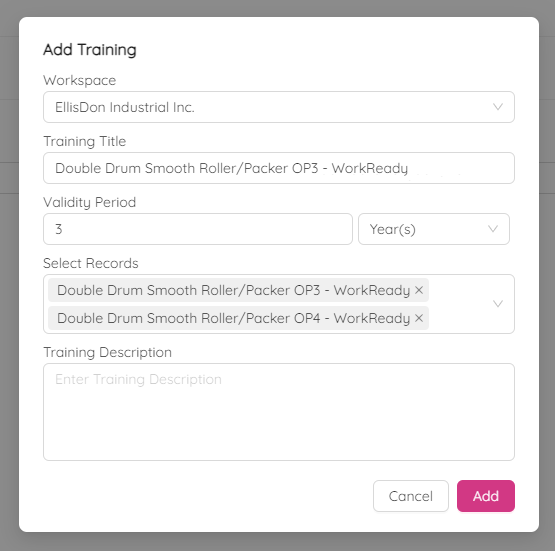
To add training, select desired workspace and enter training details such as title, validity period and related records. Submit the training by clicking the Add button.